Power rating
Published detailUp to 600 W full-load supplier rating for the chassis family. Optional Cloud AI 100 Ultra cards are rated 150 W each. No measured AC wall result for the selected bundle. [1]
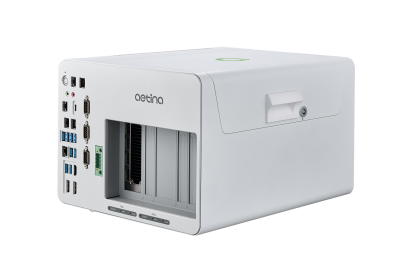
Manufacturer product image. The selected configuration may vary.
 Deskside workstation
Qualcomm Cloud AI 100 Ultra · up to 2 cards
A complete OEM workstation for on-premises inference, using Qualcomm Cloud AI accelerators and the AI Inference Suite.
BEFORE IT ARRIVES
What this configuration needs on your premises.
An industrial DC-powered system that needs a complete integration quote. The bare system does not include its power supply or accelerator cards.
Up to 600 W full-load supplier rating for the chassis family. Optional Cloud AI 100 Ultra cards are rated 150 W each. No measured AC wall result for the selected bundle. [1]
24–48 V DC through a 4-pin terminal block; up to 600 W DC input. The AIP-FR68-A2 bare system excludes the power supply. [1]
No machine-specific branch-circuit requirement verified. Check the nameplate, regional cord and other loads on the same circuit.
Chassis thermal design supports two passive Cloud AI 100 Ultra cards. Passive cards rely on system cooling; they do not make the complete computer fanless. [1]
Chassis ratings: 0–50°C with a 165 W passive GPU; 0–40°C with a 300 W active GPU. Obtain approval for the exact one- or two-card Qualcomm bundle. [1]
No comparable noise measurement under an AI workload verified. Ask for dB(A), distance, workload and ambient conditions; audition it before placing it beside people.
ACTUAL CONSUMPTION
PSU capacity, chip TDP and measured consumption describe different things. Only measurements with a stated configuration and test method appear here.
No attributable wall-power test for this configuration was established in this review. Measure at the outlet with the exact model, workload, runtime and power mode recorded.
Allow for sustained room heat, including after office hours. A ventilated equipment room may be more practical for multiple systems or continuous jobs. An internal liquid cooler does not remove the need for room cooling.
Lab planning guidance. Office suitability depends on the installed configuration, shared circuits, heat removal and acceptable noise; a workstation label alone does not settle it.
Enter average power at the wall for the hours you are modeling, or an explicit planning assumption. Supply wattage and chip TDP are not consumption measurements.
Add wall power to calculate a scenario.
Scenario only. Hours outside this period are excluded: include idle time for an always-on system. Displays, networking, UPS losses and room air conditioning are extra. Heat assumes the computer and power supply release their heat into this room; it does not size a circuit or an HVAC system. Currency selects your tariff’s unit, with no conversion.
Manufacturer documentation and attributed first-hand hardware inspections, scoped to the named model or configuration. “Not verified” identifies a gap in this review, not a claim that the manufacturer has no documentation. Installation assessments are the Lab’s interpretation.
Keep sensitive processing on your infrastructure. Inspect every connection in the complete stack.
Control access, connectivity and updates. A local machine still needs a secure deployment.
Generate tokens on your own compute. Understand the full cost of the useful work it delivers.
SHARED WORK AROUND THIS PLATFORM
Reference-platform guidance and field records. Exact OEM configurations need their own validation.
 Qualcomm · indexed by the LabRecipe
Follow Qualcomm’s Efficient Transformers path from model weights to accelerator execution.
THE PLATFORM BEHIND THE MACHINE
1 catalog configuration
BEYOND THE SPECIFICATION
Published guidance and checklists to help you investigate the full deployment.
An execution agent and confidential engineering test assets show how on-premises AI extends beyond office applications.
Local model inference is one part of the path. Test retrieval, documents, identity, tools and restart behavior as well.
Put quality, retries, utilization and operating effort beside token throughput.
THE CONFIGURATION
ON YOUR PREMISES
BEFORE YOU CHOOSE
Supports up to two Cloud AI 100 Ultra cards. Confirm the accelerator population and memory with the supplier.
128 GB is the memory-screen reference for one Cloud AI 100 Ultra card; availability to a compiled model depends on the runtime.
Qualcomm model conversion and runtime support require validation. A CUDA result does not establish compatibility.
The AIP-FR68-A2 orderable bare system excludes CPU, RAM, SSD, GPU card and power supply. Obtain a complete accelerator bundle quote.
Manufacturer specificationsHelp improve this record. Suggest a correction
IN THE FIELD
Operating records from customers, contributors and the Lab.
In an office, a factory, an engineering lab or beside your test equipment. Share a deployment and keep the people behind it credited.
Contribute a deploymentTHE SHARED TECHNICAL LIBRARY
Supplier recipes, community experience and UT’s deployment lessons, connected to the hardware.
QEfficient connects supported model checkpoints to Qualcomm’s accelerator toolchain.
Preserve card generation, SDK, model revision and compiler settings. A library support entry is not an Aetina performance result.
Examine what still connects beyond the premises.
Distinguish initial installation, inference, application use, authentication and updates.
Confidential Wi-Fi module test automation.
Exact hardware and proprietary test assets are not disclosed. This is an application field record.
Loading updates…
MEMBER RATINGS · SELF-DECLARED, NOT MEASURED
One rating per member, tied to a Lab profile. Stars count immediately; written verdicts are published after a quick review by the Lab team. A rating is an opinion about fit for a job, not a benchmark.
THE PEOPLE BEHIND THE MACHINES
Questions, ideas and experience from putting AI machines to work. You do not need a finished deployment to contribute.
Loading the discussion…
THE MACHINE × THE MODEL × THE WORKLOAD
Connect the model, serving stack, workload and cost of operating this box.
| Model | Serving configuration | Capacity planning | Evidence | Inspect |
|---|---|---|---|---|
| Compiled artifact · precision to select | Upstream model support | |||
| Compiled artifact · precision to select | Upstream model support |
Library support does not confirm a compiled result on the Aetina system.
Confirm card generation, SDK, memory and licensing with the supplier.
Each measured result belongs to one box configuration, one model, one serving stack and one workload. Publish latency, per-stream speed, request rate, errors and task quality together.